

Download PeaZip (32-bit) – file archiver, 7-Zip, compression tool, open source, secure archive, 32-bit, Windows, free software, utility tool, file management
Overview
PeaZip (32-bit) for Windows is a free, open-source file archiver utility designed to simplify the management of compressed files and archives. Built on the robust foundation of 7-Zip technology, it offers a powerful yet accessible solution for users seeking reliable file compression, extraction, and organization. The application is particularly tailored for users working with legacy systems or older hardware that require 32-bit compatibility, ensuring broader accessibility across diverse computing environments.
It addresses common challenges such as limited support for archive formats, lack of encryption options, and complex user interfaces in other archiving tools. By offering a comprehensive suite of features in a single, intuitive package, PeaZip helps users streamline workflows involving file backups, software distribution, and data sharing. It is ideal for both casual users and technical professionals who need a dependable tool for handling ZIP, 7Z, RAR, ISO, and other archive types.
The developer, PeaZip, has established a reputation for delivering secure, transparent, and community-driven software. The project emphasizes open-source principles, enabling transparency in code and continuous improvement through user feedback. Real-world use cases include organizing large collections of documents, preparing files for email or cloud upload, and securely archiving sensitive data. In the broader software ecosystem, PeaZip fills a critical gap by providing a free, feature-rich alternative to proprietary archiving tools, promoting digital freedom and long-term usability.
Key Features & Functionality
- Extensive Archive Format Support – PeaZip supports the creation of 7Z, ARC, BZ2, GZ, PAQ, PEA, QUAD/BALZ, TAR, UPX, WIM, XZ, and ZIP archives. It can also extract over 200 file types, including RAR, ACE, ARJ, CAB, DEB, DMG, ISO, LHA, RPM, UDF, and ZIPX, ensuring compatibility with nearly all mainstream and niche archive formats.
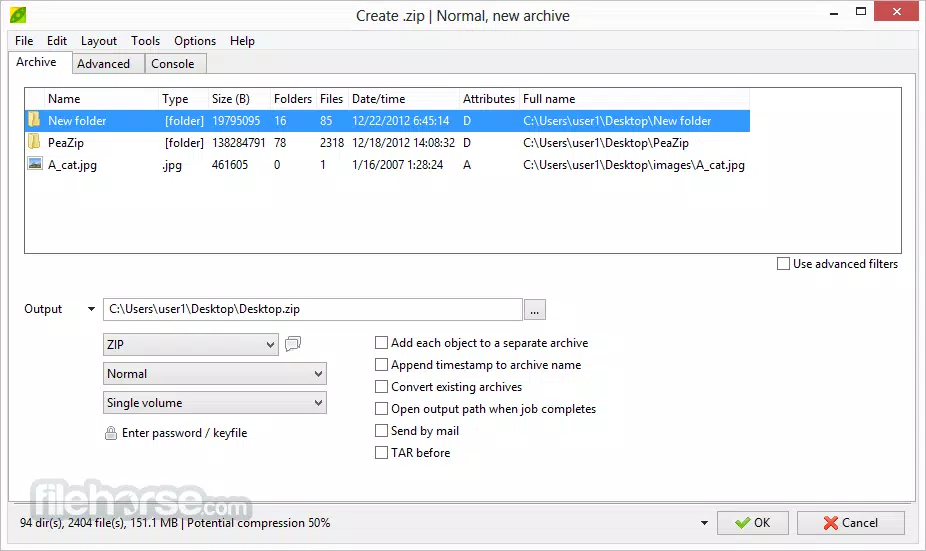
- User-Friendly Interface – The GUI is designed to resemble CD burning software, offering a visual and intuitive workflow. Users can easily drag and drop files into compression queues, preview contents, and manage extraction tasks without needing technical expertise.
- Advanced File Management Tools – Built-in features include search, bookmarks, thumbnail viewing, hashing (MD5, SHA1, SHA256), duplicate file detection, and archive conversion, enabling efficient organization and verification of archived data.
- Security-Centric Design – Strong encryption (AES-256), two-factor authentication, and secure deletion options are available. The encrypted password manager helps safeguard access to sensitive archives, enhancing data protection during storage and transfer.
- Batch Scripting and Automation – Users can save and schedule tasks as batch scripts, allowing automated backups, regular maintenance, and repetitive operations. This bridges the gap between GUI simplicity and command-line power.
For example, a user managing a digital library can use the duplicate file finder to clean up redundant entries, then compress the remaining files into a secure 7Z archive with password protection. Another user might automate nightly backups of project folders using a scheduled batch script, ensuring data integrity without manual intervention.
Interface, UX & Performance
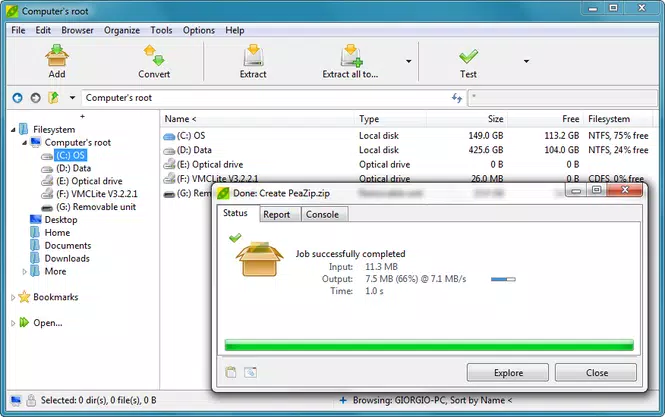
PeaZip (32-bit) features a clean, modern interface with a dual-pane layout that resembles file explorers and CD burning tools. The main window displays available archives and their contents, allowing users to preview files, extract selectively, or modify archive settings with minimal clicks. Navigation is straightforward, with clearly labeled buttons and contextual menus that reduce the learning curve.
The application integrates a full-featured file manager, enabling users to copy, move, rename, and delete files directly within the archive environment. This eliminates the need to open external tools for basic file operations. The visual feedback during compression and extraction is consistent, with progress indicators and status messages that help users monitor ongoing tasks.
Although the developer did not list formal performance metrics, the application is reported to run efficiently on systems with limited resources. The 13.3 MB file size indicates a lightweight footprint, which contributes to fast startup times and minimal memory usage. Responsiveness remains stable even when handling large archives or multiple files. Stability is maintained across different versions of Windows, though specific compatibility details were not disclosed.
Platform Compatibility & Technical Requirements
PeaZip (32-bit) is designed for the Windows operating system and is compatible with 32-bit Windows environments. It supports the latest versions of Windows, including Windows 10 and Windows 11, though the developer did not specify exact minimum OS requirements. The application is available as a standalone executable, requiring no installation or additional dependencies.
The file size is 13.3 MB, making it a lightweight tool suitable for systems with limited storage or older hardware. The software version is 7.3.1, released on May 15, 2023. No additional system requirements were listed, suggesting it can run on a wide range of devices, from low-end desktops to modern laptops. The application is distributed as a free utility, eliminating cost barriers for users across personal, educational, and professional use cases.
Pros and Cons
Pros
- Free and open-source software with transparent development
- Supports a wide range of archive formats for both creation and extraction
- Intuitive interface designed for ease of use without sacrificing power
- Strong focus on data security with encryption and secure deletion
- Lightweight and fast, with minimal system resource usage
- Batch scripting enables automation of repetitive tasks
Cons
- Only available for 32-bit Windows systems, limiting compatibility with modern 64-bit environments
- Developer did not provide detailed system requirements or performance benchmarks
- No official mobile or cross-platform versions currently available
- Interface may feel unfamiliar to users accustomed to traditional archivers like WinZip or WinRAR
- Advanced features may require some learning for beginners
FAQ
Is PeaZip (32-bit) safe to download and use?
Yes, PeaZip is a free, open-source application developed by a trusted community. It does not contain malware or adware, and its code is publicly available for review.
Can I use PeaZip on 64-bit Windows systems?
PeaZip (32-bit) is specifically built for 32-bit Windows environments. For 64-bit systems, users should consider the standard or 64-bit version of PeaZip, if available.
Does PeaZip support encryption for archives?
Yes, PeaZip offers strong encryption using AES-256, allowing users to protect their archives with passwords and two-factor authentication.
How do I automate tasks in PeaZip?
Users can save workflows created in the GUI as batch scripts and schedule them for automatic execution, ideal for backups and regular maintenance.
Is PeaZip available for mobile devices?
As of now, PeaZip is only available for Windows. There are no official mobile versions for Android or iOS.
Final Thoughts
PeaZip (32-bit) stands out as a reliable, secure, and feature-rich file archiver for users still operating on 32-bit Windows systems. Its extensive format support, intuitive interface, and strong emphasis on privacy make it a compelling alternative to commercial tools. While its 32-bit limitation restricts use on modern hardware, it remains a valuable utility for legacy environments and users prioritizing open-source transparency.
Whether you're managing personal archives, securing sensitive documents, or automating routine file operations, PeaZip delivers a powerful yet accessible experience. Its lightweight design and free availability enhance its appeal across diverse user groups.
Download PeaZip (32-bit) now


